Branches
Infrahub's branching model allows teams to work on features, fixes, or experiments in isolated environments. Each branch represents a separate line of development, enabling parallel work streams without interference. Unlike traditional version control systems, Infrahub's approach combines the familiar Git branching concepts with the unique data management capabilities of its graph database foundation.
Key aspects of branching in Infrahub:
- Isolated realities: Each branch provides a complete, isolated environment where changes can be made without affecting other branches or the production environment.
- Powerful diffing: Compare changes between branches to understand exactly what has been modified, added, or removed in your infrastructure data.
- Controlled integration: Changes flow between branches through a structured merge process that includes validation and conflict resolution.
- Data integrity: The branching system preserves data integrity through validation at key transition points.
Use cases
Branching in Infrahub supports various infrastructure management workflows:
- Large scale changes: Create a branch for a large feature or refactor, allowing for extensive changes without impacting the production pipeline. This is particularly valuable when redesigning network architectures or migrating to a new vendor.
- Collaborative review: Create a branch for a feature, allowing team members to review and discuss changes before merging. This enables quality control and knowledge sharing within the team.
- Experimentation: Use branches to test new ideas or approaches without affecting the production environment. This provides a safe sandbox to validate new configurations or architectures before committing to them.
- Grouped changes: Group related changes on one branch so that a single merge applies them to the default branch. A merge either completes or is rolled back. An interrupted merge leaves the branch in
MERGE_FAILEDuntil an administrator recovers it.
Want to see how branches can be used in a change management workflow? Read our blog post on Infrahub's Change Management Workflow Is Built for Infrastructure Data.
Core concepts
Branches in Infrahub serve as isolated workspaces where changes can be prepared, validated, and reviewed before merging into production. Each branch maintains its own independent view of the data while sharing the underlying immutable history.
Unlike traditional Git repositories that track file changes, Infrahub branches track changes to graph data representing your infrastructure. This approach provides greater flexibility when working with complex, interconnected infrastructure components while maintaining the familiar branching workflow.
Branch hierarchy
Infrahub implements a hierarchical branch model where:
- Branches are created from a parent branch (currently always
main) - Changes flow back to the parent through controlled merge operations
- Each branch has a
branched_fromtimestamp: the time it was created, or the time of its last rebase
Currently, Infrahub supports a single level of hierarchy—all branches must be created from and merged back to the default branch. This constraint simplifies conflict resolution and ensures clear change lineage.
Branch isolation modes
When creating a branch, you choose how it interacts with external Git repositories, allowing fine-tuned control over the scope of your changes:
- Full branches (
sync_with_git: true): Extend to Git repositories, allowing infrastructure-as-code changes. These branches are synchronized with corresponding Git branches, enabling coordinated changes across both Infrahub data and infrastructure code. - Data-only branches (
sync_with_git: false): Isolate changes to Infrahub data without affecting Git repositories. These branches are ideal for data updates, corrections, or enhancements that don't require changes to infrastructure code.
Branch synchronization only applies to read-write repositories. Any branch created in a read-write repository will be considered a full branch and will be propagated to the Infrahub database.
This flexibility allows different workflows—from quick data fixes to comprehensive infrastructure changes involving both data and code. Teams can choose the appropriate branch type based on the nature and scope of the changes they need to make.
Branch-aware vs branch-agnostic
Unlike Git where all content is branch-specific, Infrahub introduces a nuanced approach where some elements of the schema can bypass the branching system and be global to all branches. This design decision allows for more efficient management of system-level configurations while still maintaining isolation for user data.
- Branch-aware: Records that are local to branches and follow the standard branching workflow. Changes to branch-aware records in one branch do not affect other branches until explicitly merged. Most user-created infrastructure data falls into this category.
- Branch-agnostic: Records that exist globally regardless of branch. These typically include system data, global configurations, and reference information that should remain consistent across all branches. Changes to these records are immediately visible in all branches.
- Branch-local: Records that stay on the branch where you set them and are never merged. See Branch awareness.
You can define in the schema the branch behavior for a given node or attribute of a node.
Because a branch-agnostic value is stored once and shared by every branch, deleting the object that holds it on a single branch does not remove the value. It is released only once no branch can still read that object, which may take a later delete, merge, rebase or branch deletion — see Branch-agnostic data.
The default branch
The default branch (typically named main) in Infrahub has unique characteristics that distinguish it from other branches. It serves as the authoritative source of truth for your infrastructure and enforces stricter rules to maintain data integrity.
Integrity guarantees
The default branch enforces comprehensive integrity constraints to ensure production data quality:
- Schema validation: All data must conform to the current schema definitions, ensuring consistency and preventing invalid structures.
- Relationship integrity: All references between objects must be valid, preventing dangling references or broken relationships in the infrastructure graph.
- Uniqueness constraints: Duplicate values in unique fields are prevented, maintaining the integrity of identifiers and other unique attributes.
- Required fields: All mandatory attributes must have values, ensuring complete records that can function properly in production environments.
These protections ensure production data remains consistent, valid, and ready for deployment to real infrastructure environments.
Performance trade-offs
The integrity guarantees of the main branch come with performance implications that users should be aware of:
- Sequential writes: Certain operations serialize to prevent conflicts, ensuring data consistency at the cost of some concurrency.
- Validation overhead: Every change undergoes comprehensive validation, adding processing time but ensuring data quality.
- Lock contention: Concurrent modifications may experience delays as the system prevents potentially conflicting changes.
A Proposed Change runs the full validation, and at merge time Infrahub checks conflicts and constraints again against the current default branch.
Best practices
To get the most out of Infrahub's branching capabilities, consider these recommended practices:
- Use descriptive branch names: Name branches in a way that clearly identifies their purpose, such as
feature-network-redesignorfix-datacenter-connectivity. - Keep branches short-lived: Complete work and merge branches promptly. Infrahub does not indicate that the default branch has changed, so until you rebase a long-lived branch it keeps returning the default branch's data from its
branched_from. Enabledelete_branch_after_mergein the configuration to automate cleanup of merged branches. - Rebase before creating a Proposed Change: Update your branch with the latest changes from the default branch to identify and resolve conflicts early. See Rebase a branch. When several branches are open at once, see Parallel branches.
- Use data-only branches for quick fixes: When changes don't require infrastructure code updates, data-only branches provide a streamlined workflow.
- Set branch permissions: Restrict who can create branches and merge to the default branch to maintain quality control in production environments.
- Document branch purpose: Add clear descriptions to branches to help team members understand their purpose and scope.
Branch lifecycle
Understanding the branch lifecycle helps teams manage the flow of changes through Infrahub and integrate them effectively into production environments:
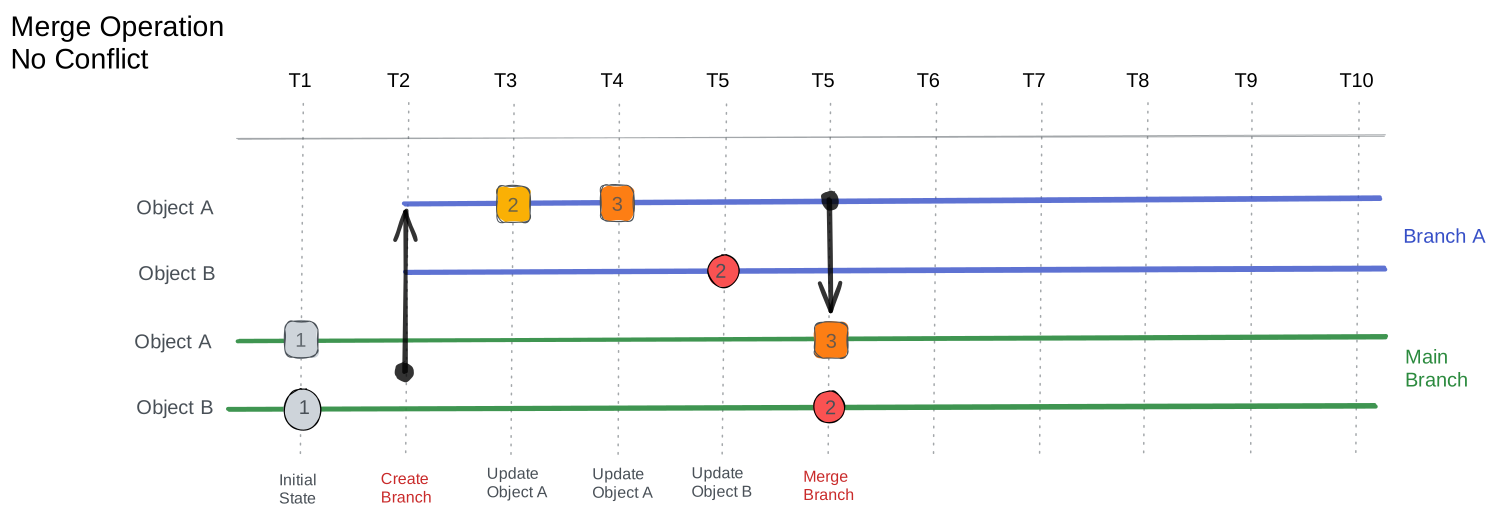
- Branch creation: Establishes an isolated workspace at a specific point in time, capturing the state of the parent branch as a starting point. See Create a branch.
- Development: Changes accumulate in the branch without affecting the main branch, allowing for focused work and experimentation.
- Validation: Proposed Changes run automated checks and tests to verify the integrity and functionality of modifications before integration.
- Conflict resolution: Any conflicts with the main branch are identified and resolved, ensuring smooth integration of changes. See Resolve conflicts.
- Merge: Approved changes integrate into the main branch through a controlled process that preserves the integrity of the production environment. While the merge runs, writes to the source branch and to the default branch are temporarily blocked to keep the data consistent — see Merge a branch. After the merge completes, the branch enters a frozen state: all further mutations (create, update, upsert, delete) are blocked on that branch, the UI disables editing controls with a visual indicator, and no new Proposed Change can be opened against it.
- Cleanup: After a successful merge, the branch can be deleted manually or automatically when
delete_branch_after_mergeis enabled in the configuration. If the branch is synchronized with a Git repository, enablingdelete_git_branch_after_mergealso removes the corresponding remote branch.
Once merged, a branch enters a frozen state and no further mutations are allowed on it. Creating a new Proposed Change against a merged branch is also prevented.
Once deleted, a branch enters a terminal state and can no longer be updated. Creating a Proposed Change against it, rebasing it, and triggering validation on it are no longer possible.
This structured approach ensures that changes are thoroughly validated before reaching production while giving teams the flexibility to work independently. The pages below cover each branch operation in detail.
Branch statuses
Infrahub blocks some actions on a branch while a merge is running, after a merge has failed, after the branch has merged, or when the branch needs a rebase. It marks each of these with a branch status:
| Status | Set by | Blocks | Cleared by |
|---|---|---|---|
OPEN | Creating the branch, a rebase, or a merge that is rolled back or recovered | Nothing | — |
NEED_REBASE | Converting the kind of a branch-agnostic object whose branch-aware attributes carry over to the new kind, which runs on the default branch and marks every other branch that is not merged or being deleted | Writes to the branch. Rebasing or deleting it, creating a branch, and opening a Proposed Change still work | A rebase |
NEED_UPGRADE_REBASE | infrahub upgrade, on every open branch on an older graph version; also set while a branch migration runs | Merging the branch. Writes still work | A rebase |
MERGING | The start of a merge | Writes to the branch and to the default branch, and deleting the branch | The end of the merge: MERGED when it completes, OPEN when it is rolled back, MERGE_FAILED when it is interrupted |
MERGE_FAILED | Infrahub, when the worker running the merge is no longer live | Writes to the branch and to the default branch, and deleting the branch | infrahub recover merge |
MERGED | A completed merge | Every change to the branch except deleting it | Not cleared: a merged branch stays read-only |
In the web interface, Infrahub shows a badge on the branch: Open for OPEN on the branch details page, Rebase needed for NEED_REBASE, Rebase needed (upgrade) for NEED_UPGRADE_REBASE, Deleting for DELETING, and Merged for MERGED. It shows no badge for MERGING or MERGE_FAILED, so query the branch's status to see those.
OPEN does not mean a branch is up to date with the default branch. Rebase the branch to include changes merged there since.
Implementation details
Copy-on-write semantics
Branches don't duplicate the entire database. Instead, they maintain:
- Their
branched_fromtimestamp - Only the delta of changes made within the branch
- References to unchanged data in the parent branch
When you query a branch, Infrahub combines two things: the default branch's data as of the branch's branched_from timestamp, and every change made on the branch since. Changes merged into the default branch after that time are not visible on the branch until you rebase it. Branch-agnostic data is the exception: every branch sees it as soon as it changes.
This approach means creating a branch has minimal overhead, and storage grows only with actual changes. It also means that creating a new branch is almost instantaneous, as it doesn't involve copying large amounts of data.
Related topics
- Rebase a branch: what a rebase does, what blocks it, and both ways to run it
- Merge a branch: what the merge checks again, write blocking, and recovery from a failed merge
- Resolve conflicts: each conflict type and what clears it
- Parallel branches: Why merging one branch does not change the others, and when to rebase
- Branching blog post: a change management workflow built on branches and Proposed Changes
- Git Integration: how branches synchronize with connected Git repositories
- Proposed Changes: review, checks, and merge for a branch
- Immutable History: how Infrahub keeps earlier values and relationships
- Schema: the nodes, attributes, and relationships your data follows
- Branch awareness: setting a schema element as branch-aware, branch-agnostic, or branch-local